Object - Use sip.exe of pyqt5 of windows to write a sample with mingw
python-to-clang extension
- pyqt uses sip
- wxwidget uses swig
- kivy uses cython
Env
- python –vesion Python 3.5.2
- python -m pip -V pip 9.0.1 from c:\python35\lib\site-packages (python 3.5)
- mingw64 **x64 ** x86_64-7.1.0-win32-seh-rt_v5-rev2
- 2015 visual studio (optional)
‘msvc’ MicroSoft Visual studio Compiler
Overview
2 way to build pyd
-
configure way: split origin library and generate pyd
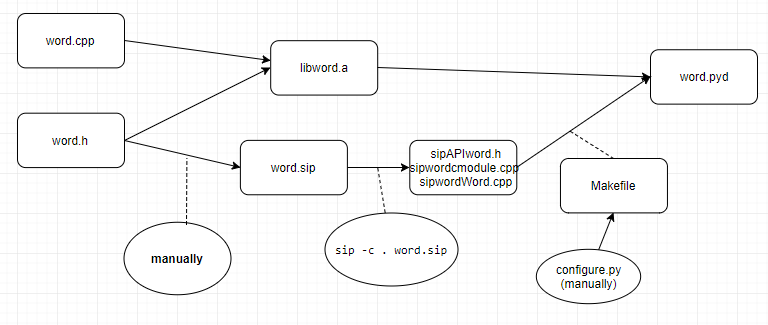
-
setup way: build and generate pyd in setup.py script
Same as configure way. but it builds libword.a in setup.py
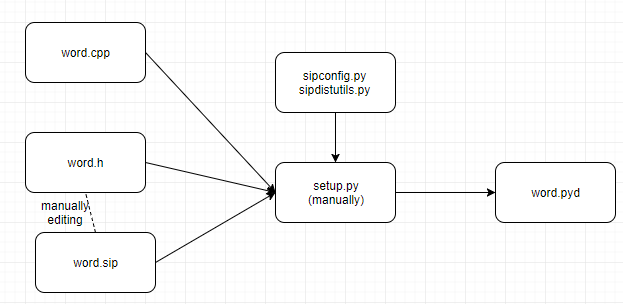
mingw normal usage
C:\mingw64>mingw-w64
- PATH c:\mingw64\mingw64\bin;
Has native tools
- mingw32-make
- gcc.exe
- g++.exe
**Caution!**
mingw uses dos filepath, not unix-like filepath
msys uses unix-like filepath
cygwin uses unix-like filepath
mingw build static library
use g++ to compile object files use ar to compile static library
https://www.codeproject.com/Articles/84461/MinGW-Static-and-Dynamic-Libraries
Compiling the static library
>gcc -c add.c -o add.o
>ar rcs libadd.a add.o
compiling the dynamic library
gcc -c add.c -o add.o
gcc -shared -o libadd.so add.o
gcc -o main.exe main.c libadd.so
PyQt4 sip sample tutorial
pyqt4 sample - Error run with pyqt5 ! no sipconfig ! no sipdistutils
ImportError: No module named ‘sipconfig’ change to sipdistutils. Still failed
BOTH are Not longer support at PyQt5 and sip5 further
http://pyqt.sourceforge.net/Docs/sip4/using.html
- solution!
download sip source and generate win32-g++ or msvc sipconfig.py
copy sipconfig.py and sipdistutils.py to project folder
How to get sipconfig.py for configure.py
We need to generate it from sip source code
sipconfig.py is used to generate a Makefile
  >python configure.py --platform win32-g++
  or
  >python configure.py --platform msvc
How to get sipdistutils.py for setup.py
sipdistutils.py is exists inside sip source code
sipdistutils.py is used by distutil module / setup.py of python
- discussion https://github.com/wbsoft/python-poppler-qt5/issues/14
-
download url https://www.riverbankcomputing.com/hg/sip/file/14685a6e736e/sipdistutils.py
- setup.py not found gcc change to use msvc
- setup.py not found sipconfig.py copy sip source’s sipconfig.py to local
- setup.py can not find the sip.h and sip.exe change sipconfig.py setting https://docs.python.org/2/distutils/setupscript.html
- cannot find word.h/word.cpp add include_dirs to setup.py Extension(“word”, [“word.sip”, “word.cpp”], include_dirs=[’.’, ]), ],
- build pass but run-time error. assert at sip.dll
Get spiconfig.py from sip ssurce code
Get spiconfig.py from sip_src.zip’s configure.y
generate a mingw64 vesrion sipconfig.py
python configure.py --platform win32-g++
generate a vs2015 version sipconfig.py
python configure.py --platform msvc
if you don’t want to pass ‘–platform wn32-g++’ to python distutil module
C:\python35\Lib\distutils\distutils.cfg
[build]
compiler=msvc
Fix Makefile from ‘python configure.py’
Use “python configure.py” to generate Makefile
the default Makefile has some bugs
 >/Library/mingw-w64/lib/gcc/x86_64-w64-mingw32/7.1.0/include/c++/cmath:1136:11: error: '::hypot' has not been declared
               using ::hypot;

                       ^~~~~
        I found a solution at
        `g++ error on import of Theano on Windows 7 <https://stackoverflow.com/questions/38536788/g-error-on-import-of-theano-on-windows-7>`_.

        The solution is to create a file in the user folder called ``.theanorc`` which contains:
        ::
            [gcc]
            cxxflags = -D_hypot=hypot
g++ -mthreads -Wl,-enable-stdcall-fixup -Wl,-enable-auto-import -Wl,-enable-runtime-pseudo-reloc -shared -Wl,-subsystem,windows -Wl,-s -o word.pyd sipwordcmodule.o sipwordWord.o -Lc:\python35\libs -lword -lpython35 -L.
c:/mingw64/mingw64/bin/../lib/gcc/x86_64-w64-mingw32/7.1.0/../../../../x86_64-w64-mingw32/bin/ld.exe: cannot find -lword
collect2.exe: error: ld returned 1 exit status
mingw32-make: *** [Makefile:36: word.pyd] Error 1
python setup.py bdist screenshot
running bdist
running bdist_dumb
running build
running build_ext
installing to build\bdist.win-amd64\dumb
running install
running install_lib
creating build\bdist.win-amd64
creating build\bdist.win-amd64\dumb
creating build\bdist.win-amd64\dumb\python35
creating build\bdist.win-amd64\dumb\python35\Lib
creating build\bdist.win-amd64\dumb\python35\Lib\site-packages
copying build\lib.win-amd64-3.5\word.cp35-win_amd64.pyd -> build\bdist.win-amd64\dumb\python35\Lib\site-packages
running install_egg_info
Writing build\bdist.win-amd64\dumb\python35\Lib\site-packages\word-0.0.0-py3.5.egg-info
creating J:\git_home\workspace\qt\siptest\sip_tutorial1\dist
creating 'J:\git_home\workspace\qt\siptest\sip_tutorial1\dist\word-0.0.0.win-amd64.zip' and adding '.' to it
adding 'python35\Lib\site-packages\word-0.0.0-py3.5.egg-info'
adding 'python35\Lib\site-packages\word.cp35-win_amd64.pyd'
removing 'build\bdist.win-amd64\dumb' (and everything under it)

c:\python35\lib\distutils\dist.py:261: UserWarning: Unknown distribution option: 'versione'
  warnings.warn(msg)
running install
running build
running build_ext
running install_lib
copying build\lib.win-amd64-3.5\word.cp35-win_amd64.pyd -> c:\python35\Lib\site-packages
running install_egg_info
Writing c:\python35\Lib\site-packages\word-0.0.0-py3.5.egg-info